With the function Add record it is possible to add one or several data records to a JobData table.
The following settings can be made:
Setting |
Description |
|---|---|
JobData table |
Select the JobData table, to which you want to add data. |
Fix subtable |
If you want to add several data records, you can select a process subtable here, which you can use for the assignment of input and output parameters. In this case, the data for the new data records will be taken from this table. |
Input parameters |
Description |
|---|---|
Assignments |
Here you can link the respective column of the JobData table with data from the process- or subtable. |
Output parameters |
Description |
|---|---|
Record-ID |
The unequivocal identifier of the new data record. |
Return code |
In case of an error, the return code -1 will be displayed in the indicated field. |
Error message |
Determine, where the error messages, occurring during the execution of the function, should be stored. |
Example
JobData table COMPANY_VEHICLES :
JRID |
REG_NUMBER |
VTYPE |
ASSET_NO |
|---|---|---|---|
12345 |
MA-JR 2018 |
XC60 T6 |
C73-00-83 |
12346 |
MA-JR 2017 |
V60 D4 |
A13-12-51 |
12347 |
MA-JR 1111 |
XC60 D5 |
C-27-59-77 |
Configuration:
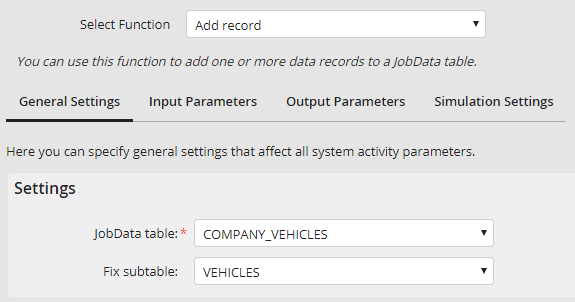
General settings
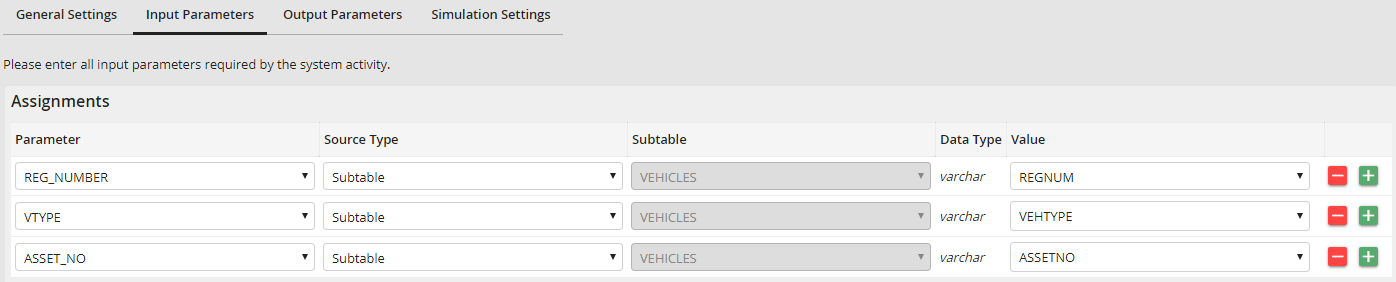
Input parameters
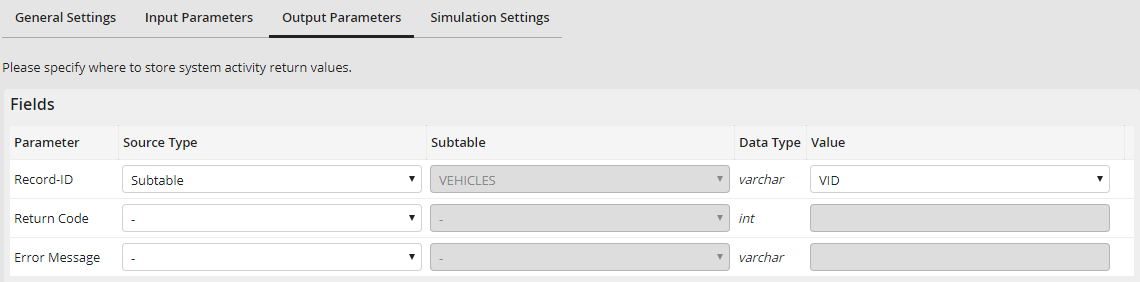
Output parameters
Execution with two entries in the subtable:
VID |
REGNUM |
VEHTYPE |
ASSETNO |
|---|---|---|---|
MA-JR 2233 |
XC60 T6 |
C73-23-34 |
|
MA-JR 2211 |
XC60 D5 |
C73-25-56 |
Content of JobData table COMPANY_VEHICLES after execution:
JRID |
REG_NUMBER |
VTYPE |
ASSET_NO |
|---|---|---|---|
12345 |
MA-JR 2018 |
XC60 T6 |
C73-00-83 |
12346 |
MA-JR 2017 |
V60 D4 |
A13-12-51 |
12347 |
MA-JR 1111 |
XC60 D5 |
C-27-59-77 |
12348 |
MA-JR 2233 |
XC60 T6 |
C73-23-34 |
12349 |
MA-JR 2211 |
XC60 D5 |
C73-25-56 |
Content of subtable:
VID |
REGNUM |
VEHTYPE |
ASSETNO |
|---|---|---|---|
12348 |
MA-JR 2233 |
XC60 T6 |
C73-23-34 |
12349 |
MA-JR 2211 |
XC60 D5 |
C73-25-56 |
