A JobRouter process forms the scheme for individual instances. An instance is thus one instance of the process. A process always comprises one or more steps which are executed sequentially or in parallel. Steps can be set for all forms. That makes an interaction between user and system possible. Steps are sent for processing to either a Job Function or to a specific user. Job Functions allow you to assign a specific task to a group of people. A Job Function can be considered as a function within a process or a department (such as Manager of IT).
Every enabled step of a process appears in the inbox of a user or a Job Function member. The user opens and edits the step via the corresponding form, which conveys information to the user and allows the user to input his own data, make decisions, or perform other tasks outside of the workflow system.
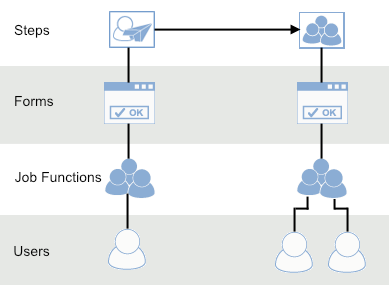
JobRouter Process Construction
For every JobRouter step you can establish any number of rules by which you define the subsequent flow of the process.
Example: A rule can forward an invoice to the supervisor of the processor if the invoice amount is greater than € 50,000.
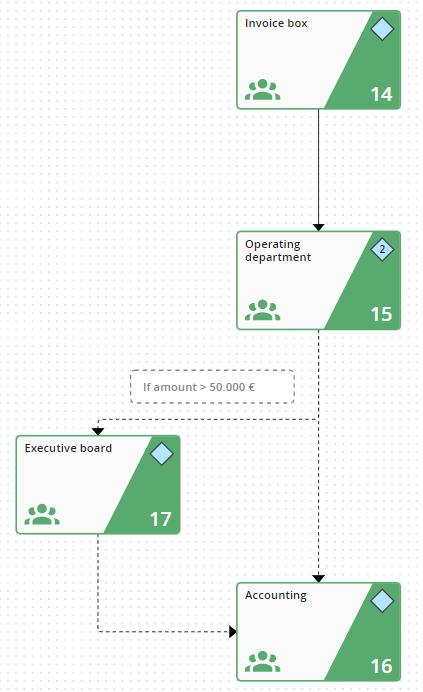
Invoice Arrival with rules for the Invoice Amount
Rules control which subsequent steps and Job Functions are involved in a process. Additionally, it is also possible to integrate other functions into the process, such as sending an e-mail, executing SQL commands, or exporting data.
For every process you set up a work table, the so called process table, in the database. It contains all the relevant data for a process, such as the invoice number, invoice date, or vendor. In the process table you add a cell for every step of the process. The overall flow of the process or instance is thus documented, and you can use the table to easily assess the process flow.
The most important elements of a process:
Element |
Description |
|---|---|
Process Table |
•The table stores all the process information. |
Step |
•A step is a task within the process. |
Forms |
•Forms display the process data •They allow users to work on the process data |
Rules |
•Rules allow flexible process flows. •Rules execute various functions. |
