This function displays one or several step actions in the form.
Parameter |
Type |
Description |
|---|---|---|
action |
string | array |
Action name of array with the name of the actions that are to be displayed. |
Possible actions are:
•abort
•answer
•assign
•back
•finish
•jumpTo
•request
•resubmission
•save
•send
If several actions are committed they will be shown successively. If the committed array contains other action names, the function will display an error message containing the not supported actions. Valid actions will be displayed despite the error message.
Note: Only functions activated in the step can be displayed!
Example
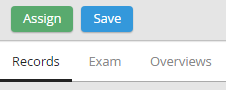
In a dialog the actions Send and Assign are hidden. After activating the function for the action Assignit will be displayed in the form:
jr_show_step_action('assign')
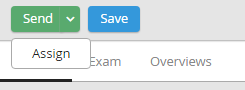
If the action Send is displayed thereafter, it will be shown as top action button and Assign will be moved into a drop-down list:
jr_show_step_action('send')