On this tab you can define, which values you want to write back into the instance.
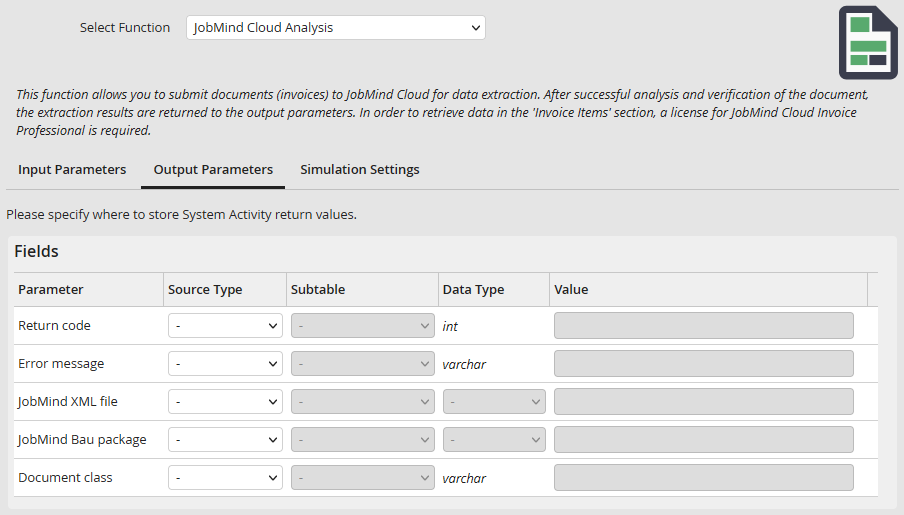
Output parameters - single fields
Fields
Parameter |
Description |
|---|---|
Return value |
In case of a successfully performed action, this parameter contains the value 1, otherwise the value -1. |
Error message |
If an error occurred during the performance of an action, this is the parameter that supplies the error message. |
JobMind XML file |
Here you can select the attachment row where the XML file containing the analysis results should be saved. Usually you do not need this file, though it can be helpful for troubleshooting in case of errors. |
JobMind Bau package |
Here you can select the attachment column in which the JobMind Bau package should be inserted in the form of a Zip file. The input parameter Provide JobMind Bau package must be activated. The option is only displayed in case of an existing license for the JobMind Bau modules. |
Document class |
This parameter supplies the document class of the analyzed document. |
Recipient data
Here you can insert the identified recipient data into the process table fields.
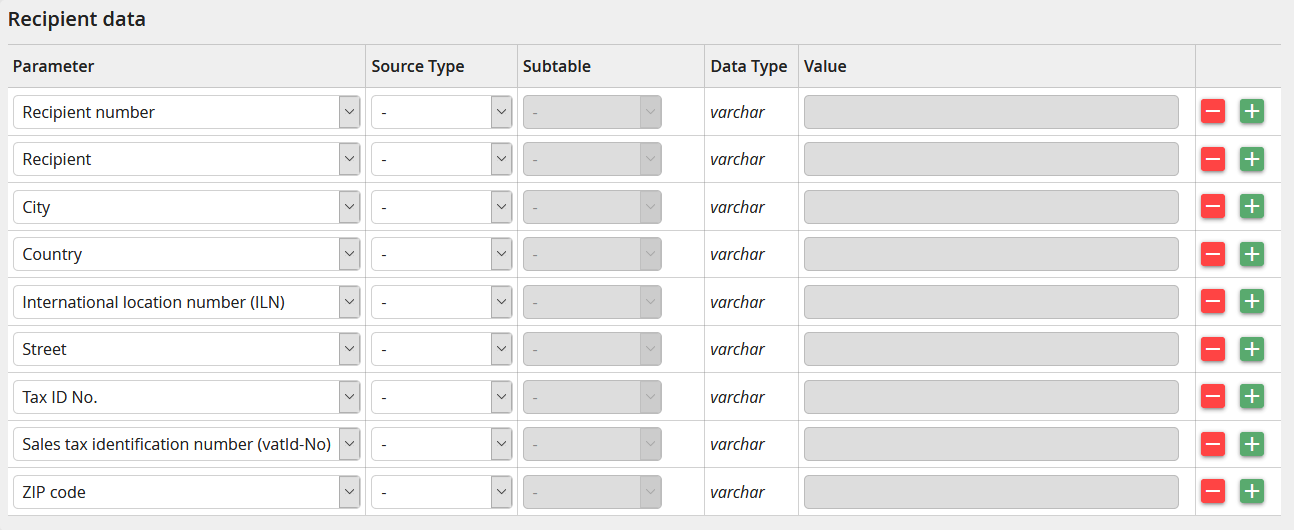
Output parameters - recipient data
Parameters |
Description |
|---|---|
Recipient number |
Client number or accounting area |
Recipient name |
Name of the invoice recipient |
International location number (ILN) |
International location number (ILN) |
Country |
Country |
Zip code |
Zip code |
City |
City |
Tax No. |
Tax number of the invoice recipient |
Street |
Street incl. house number |
Sales tax identification number (VAT-ID-No.) |
Sales tax identification number (VAT-ID-No.) |
Supplier data
Here you can insert the identified supplier data into the process table fields.

Output parameters - supplier data
Parameters |
Description |
|---|---|
Bank sort code |
Bank sort code of the supplier |
BIC |
BIC number of the supplier |
E-Mail address |
E-Mail address |
Fax number |
Fax number |
IBAN |
IBAN number of the supplier |
International location number (ILN) |
International location number (ILN) |
Account number |
Account number |
Country |
Country of the supplier |
Supplier |
Name of the supplier |
Supplier number |
Supplier number |
Name of the bank |
Name of the supplier's bank |
Zip code |
Zip code |
Contact person |
Contact person |
City |
City |
Tax number |
Tax number of the supplier |
Telephone number |
Telephone number |
Sales tax identification number (VAT-ID-No.) |
Sales tax identification number (VAT-ID-No.) |
Invoice data
Here you can insert the head data of the invoice. Among the invoice number and the invoice date you can also choose between numerous amount fields, which enable you to read net, gross or accounted tax amounts. Furthermore, fields such as request number, project number, customer number and cost center are available.

Output parameters - invoice data
Parameters |
Description |
|---|---|
Surcharge |
Surcharges and specific additional costs |
Order number |
Order number of the invoice |
Freight costs |
Freight costs and freight charges |
Total amount |
Total amount of the invoice (gross) |
Cost center |
Cost center |
Client number |
Client number |
Delivery date |
Delivery date |
Delivery month |
Delivery month |
Delivery week |
Delivery week |
Toll fees |
Accruing toll fees |
Minimum quantity surcharge |
Minimum quantity surcharge |
Postage costs |
Postage costs |
Project number |
Project number |
Discount 1 |
Lump-sum discount on total invoice 1 |
Discount 2 |
Lump-sum discount on total invoice 2 |
Discount % 1 |
Percentage discount on total invoice 1 |
Discount % 2 |
Percentage discount on total invoice 2 |
Invoice date |
Invoice date |
Invoice number |
Invoice number |
Invoice complies with all legal requirements |
Label stating that the invoice complies to all legal requirements |
Invoice is an invoice correction |
Label stating that the invoice is a corrected invoice |
Reference number |
Reference number |
Reverse charge |
Label stating if the invoice is subject of the reverse charge system |
Tax amount 1 |
Tax amount 1 |
Tax amount 2 |
Tax amount 2 |
Tax amount 3 |
Tax amount 3 |
Tax amount 4 |
Tax amount 4 |
Tax percentage rate 1 |
Tax percentage rate 1 |
Tax percentage rate 2 |
Tax percentage rate 2 |
Tax percentage rate 3 |
Tax percentage rate 3 |
Tax percentage rate 4 |
Tax percentage rate 4 |
Tax amount 1 |
Net amount 1 |
Tax amount 2 |
Net amount 2 |
Tax amount 3 |
Net amount 3 |
Tax amount 4 |
Net amount 4 |
Packaging costs |
Packaging costs |
Insurance costs |
Insurance costs |
Currency |
Currency of the invoice |
Customs |
Customs duties |
Invoice positions
Here you can write invoice positions into defined subtable fields.
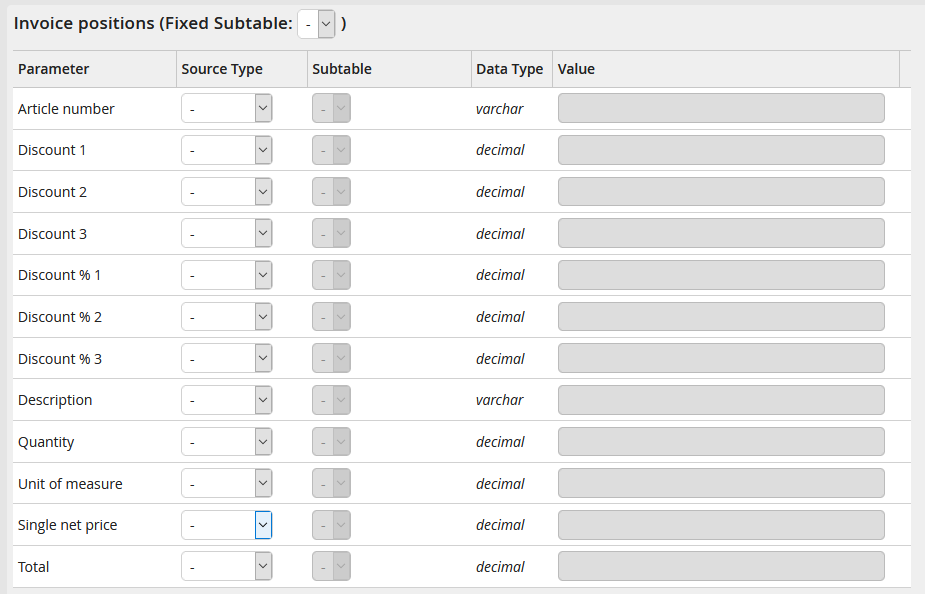
Output parameters - invoice positions
