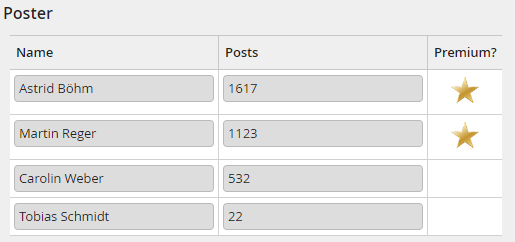
In this example some blog post data is read from an external database and written to a JobRouter subtable. Based on the blog post ratings, an image is also stored per row.
Notes about the functionality is included in the PHP comments. Some logs help to follow the execution.
class className extends JobRouter\Engine\Runtime\PhpFunction\RuleExecutionFunction
{
public function execute($rowId = null)
{
// Retrieve database connection object
$statsDb = $this->getDBConnection('mysqlmaster');
// Retrieve statistics from external database
$stats = $this->retrieveStats($statsDb);
$premiumImage = 'Gold-star.jpg';
// Clean up subtable (if any data is already contained)
$this->clearSubtable('BLOGSTATS');
// Write to JR subtable
$rowId = 1;
while($userData = $statsDb->fetchRow($stats)) {
$this->debug('Unformatted last post date: ' . $userData['post_date']);
$postDate = DateTimeImmutable::createFromFormat('Y-m-d H:i:s', $userData['post_date']);
$this->debug('Formatted last post date: ' . $postDate->format('Ymd'));
$posts = (int)$userData['post_count'];
$rowData = [
'LAST_POST_DATE' => $postDate->format('Y-m-d'),
'POSTER_USERNAME' => $userData['poster_username'],
'POSTS_COUNT' => $posts,
'RATING' => $userData['poster_rating'],
'RATING_IMAGE' => $this->isPremiumPoster($posts) ? $premiumImage : null,
];
$this->debug('Insert row at position ' . $rowId, ['data' => $rowData]);
$this->insertSubtableRow('BLOGSTATS', $rowId, $rowData);
$rowId++;
}
$this->info($rowId - 1 . ' rows inserted');
}
/**
* In this function, the statistics data is retrieved. In case of a database error the error message, the SQL statement, parameters and types are logged.
* The exception is passed to the step execution logic and will lead to an error, which will set the step in error status.
*/
private function retrieveStats($statsDb)
{
$sql = 'SELECT poster_username, post_date, post_count, poster_rating FROM BLOGSTATS where category = :category and status = :status';
$parameters = [
'category' => $this->getTableValue('BLOG_CATEGORY'),
'status' => 1
];
$types = [
JobRouter\Common\Database\ConnectionInterface::TYPE_TEXT,
JobRouter\Common\Database\ConnectionInterface::TYPE_INTEGER,
];
try {
return $statsDb->preparedSelect($sql, $parameters, $types);
} catch (JobRouterException $e) {
$this->error('Could not retrieve statistics: ' . $e->getMessage(), ['sql' => $sql, 'parameters' => $parameters, 'types' => $types]);
throw $e;
}
}
private function isPremiumPoster(int $posts): bool
{
return $posts > $this->getConfiguration('premium_mark');
}
}
?>
After the execution of the PHP function, the retrieved data can be displayed in a subtable view in the step form. Example: