In this example, files are exported from a JobRouter subtable to the file system, if they were marked for export.
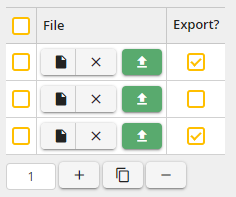
Mark files for export
PHP-Function:
<?php
class className extends JobRouter\Engine\Runtime\PhpFunction\RuleExecutionFunction
{
public function execute($rowId = null)
{
// Retrieve path for export file. We can use the output/temp path for such files.
$tempPath = $this->getFullTempPath();
// To avoid conflicts, we will export to folder named after the process instance ID.
$folder = $tempPath . '/' . $this->getProcessId() . '/';
if (!file_exists($folder) && !mkdir($folder, 0777)) {
// For some reason the folder can not be created. The access rights configuration must be checked.
throw new JobRouterException('Could not create export folder');
}
$this->info('Export folder ' . $folder);
// Retrieve files from subtable
$rowIds = $this->getSubtableRowIds('MEETING_ATTACHMENTS');
foreach ($rowIds as $rowId) {
$this->debug('Row ' . $rowId);
$shouldExport = $this->getSubtableValue('MEETING_ATTACHMENTS', $rowId, 'EXPORT_FLAG');
// The file name may contain some characters that are replaced on upload, so we read the original file name to use it in logging.
$fileName = $this->getOriginalFilename('ATTACHED_FILE', $rowId, 'MEETING_ATTACHMENTS', true);
$this->debug('Filename ' . $fileName);
if (!$shouldExport) {
$this->debug('Skip file ' . $fileName);
continue;
}
// All attachments are stored in the JobRouter upload-path, here we retrieve the relative path to the file as it is named in the file system.
$filesystemFilename = $this->getFilesystemFilename($fileName);
$this->debug('File on file system ' . $filesystemFilename);
// Get full file system path to the file
$fullFilePath = $this->getFullUploadPath($filesystemFilename);
$this->info('Export file ' . $fullFilePath);
// Copy to temporary folder for further usage
if (!copy($fullFilePath, $folder . basename($filesystemFilename))) {
$displayFileName = $this->getOriginalFilename('ATTACHED_FILE', $rowId, 'MEETING_ATTACHMENTS');
throw new JobRouterException('Could not export file ' . $displayFileName);
}
}
}
}
?>
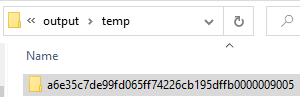
Example folder on file system after execution: