This example shows how to develop a widget that displays a simple measure on the dashboard based on the number of active users .
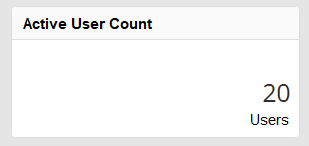
Finished widget on the dashboard
To create a new widget, first create the necessary files. In this example, the ActiveUserCount widget is created in the MyWidgets namespace. This means that the PHP file for the widget must be located under <jobrouter>/dashboard/MyWidgets/ActiveUserCount/ActiveUserCount.php. To display the widget a template is also required. For this, the <jobrouter>/dashboard/MyWidgets/ActiveUserCount/template.hbs file is created. The directory tree then looks as follows:
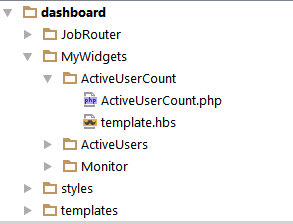
Directory structure of the widget
First the namespace is specified in the PHP file and then the Widget API class is imported. Afterwards the ActiveUserCount class is created, which extends the Widget API class. The name of the class matches the name of the widget and the directory name.
<?php
namespace dashboard\MyWidgets\ActiveUserCount;
use JobRouter\Api\Dashboard\v1\Widget;
class ActiveUserCount extends Widget
{
public function getTitle()
{
return 'Active User Count';
}
public function getCategory()
{
return 'administration';
}
public function getData()
{
return [
'count' => $this->getCount(),
'unit' => 'Benutzer',
];
}
private function getCount()
{
$jobDB = $this->getJobDB();
$sql = "SELECT COUNT(*) FROM JRSESSIONS";
$result = $jobDB->query($sql);
if ($result === false) {
return 0;
}
return $result->fetchOne();
}
}
The getTitle function is overwritten and returns the ActiveUserCount value. This will be displayed later in the title bar of the widget and in the collection. At this time, the widget can already be used, but no data will be displayed.
The getData method is implemented to query the required data. Here the data is collected that should be displayed in the template later. The number of users is determined in the separate getCount method. In addition, the word user is assigned to the key unit, in order to display it as a unit of the count.
<div class="jr-dashboard-display-info-count">
{{count}}
<div class="jr-dashboard-display-info-unit">{{unit}}</div>
</div>
In the template the data are received and inserted at the place of the placeholders.
The widget now displays the expected data on the dashboard.
Since the number of logged-in users is administrative data, the category (see getCategory) of the widgets is set to administration. This also ensures that only administrators can select the widget.
