Open the JobRouter main directory. Before you can start with the implementation, the basic directory and subdirectory for system activities in the subfolder systemactivities has to be created. The following illustration shows an example of the structure of the basic directories and the necessary files for the system activities (in this example csv).
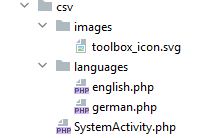
Directory |
Description |
|---|---|
csv |
The basic directory of the CSV system activity |
csv/images |
Subdirectory, in which images and logos of the system activity are saved |
csv/languages |
In the subdirectory languages language files can be stored, which are automatically loaded according to the JobRouter configuration |
