The list element is used within the parameter configuration to display a list of fields to which various elements can be added and removed.
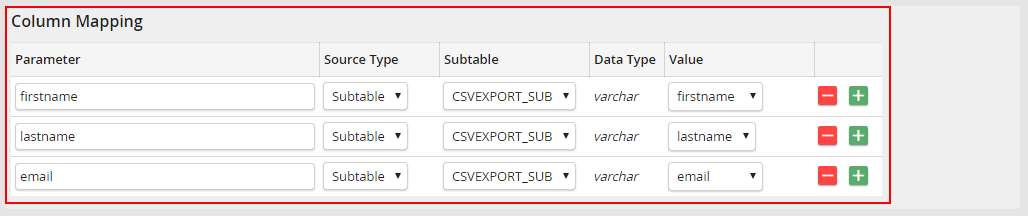
The following attributes can be used for the list element:
Attribute |
Value |
Required |
Explanation |
|---|---|---|---|
id |
text |
yes |
Unique id for the parameter |
name |
text (translatable) |
yes |
Text in the form for the element |
desc |
text (translatable) |
yes |
Text which will be displayed as tool tip for the element |
worktable |
yes | no |
yes |
Process table can be used as source type |
subtable |
yes | no |
yes |
Subtable can be used as source type |
fixed |
yes | no |
yes |
Fixed value can be used as source type |
datatype |
int | decimal | varchar | date | file |
yes |
Data type for the element |
required |
yes | no |
no |
Defines if a field is a required field |
texttype |
checkbox |
no |
Displays a checkbox instead of a value |
udl |
yes |
no |
Display form field in the parameter column |
default |
int |
no |
Number of predefined list entries on the first invocation. |
Selection list as form field for parameters
To display a selection in the Parameter column instead of an input field, use the parameter udl=yes. In the system activity, you must also implement the getUDL method with a two-dimensional array of the required entries as a return value (see section Optional Methods).
Example: Parameters as selection list
Configuration
<list id="fieldList1" name="First list" worktable="yes" subtable="no" fixed="no" datatype="varchar" required="no" udl="yes">
<list id="fieldList2" name="First list" worktable="yes" subtable="no" fixed="no" datatype="varchar" required="no" udl="yes">
Definition of a selection list in SystemActivity.php
public function getUDL($udl, $elementID)
{
if ($elementID == 'fieldList1') {
return [
['name' => '-', 'value' => ''],
['name' => 'Option 1', 'value' => '1'],
['name' => 'Option 2', 'value' => '2'],
['name' => 'Option 3', 'value' => '3']
];
}
if ($elementID == 'fieldList2') {
return [
['name' => '-', 'value' => ''],
['name' => 'Option 1', 'value' => '1'],
['name' => 'Option 2', 'value' => '2'],
['name' => 'Option 3', 'value' => '3']
];
}
return null;
}
Display in System Activity Dialog

Reading values when the system activity is executed
protected function firstFunction()
{
$stepStatus = $this->getStepStatus();
$list1Values = $this->resolveInputParameterListValues('fieldList1');
$list2Values = $this->resolveInputParameterListValues('fieldList2');
foreach ($list1Values as $paramName => $value) {
if ($paramName == '1' && $value == 'Ende') {
$this->setStepStatus(99);
return;
}
}
foreach ($list2Values as $paramName => $value) {
if ($paramName == 'param1' && $value == 'Ende') {
$this->setStepStatus(99);
return;
}
}
if ($stepStatus == 0) {
$this->setStepStatus(1);
}
if ($stepStatus == 1) {
$this->setStepStatus(99);
}
}
