You can alter the following properties:
Setting |
Description |
|---|---|
Subtable |
If you select a fixed process subtable, you can only select this subtable for output parameter assignments. |
You can use the following input parameters:
Input Parameters |
Description |
|---|---|
CSV file |
Select the CSV file from the attachment field or a file path or as a fixed value. |
Column delimiter |
Separators of the individual columns in the file |
Escape character |
Characters used to mark delimiters |
Text qualifier |
Character used to highlight the beginning and end of a field |
1st column contains column name |
Specify whether the first row in the file contains the column names which is omitted when importing. |
Rows per cycle |
Number of rows to be imported per cycle |
Delete file |
Specify if you want to delete the file after importing. |
Empty subtable |
Specify if the linked subtable should be emptied before importing |
Character set |
Character set of a CSV file |
The output parameters are as follows:
Output Parameters |
Description |
|---|---|
Return code |
If an error occurs, the return code -1 will be written into the selected field. |
Error message |
Specify where any error messages arising during the execution of the function should be saved. |
Number of rows |
You can output the number of rows imported in a process table field. |
Field links |
Specify which fields of the CSV file should be imported into which subtable fields. |
Example
Content of a CSV file:
ID;VENDOR;PRICE
1;Muster AG;200.00
2;Acme GmbH;203.00
Please note: The recognition of decimal separators in decimal fields for the CSV import is automated.
Configuration:
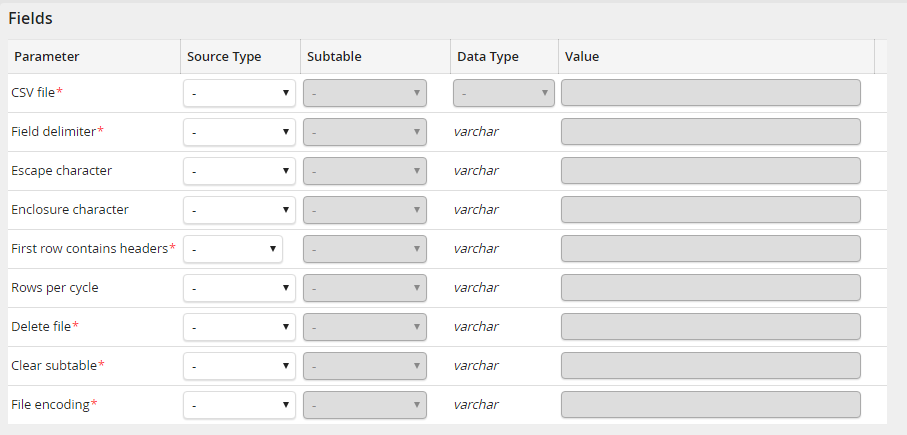
CSV System Activity: Input Parameters
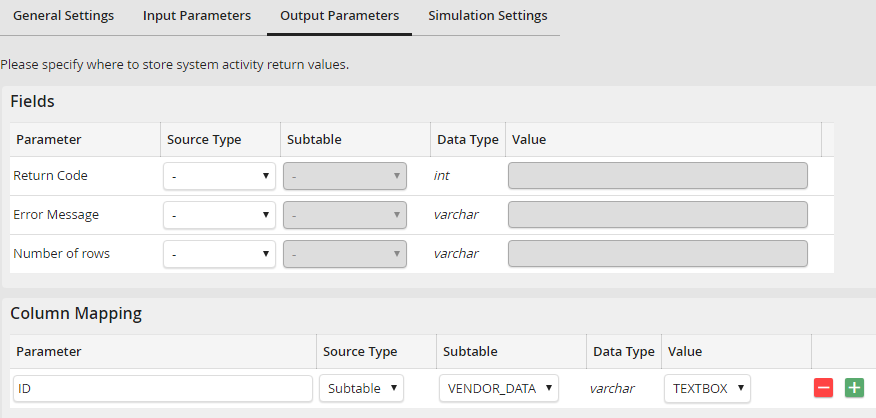
CSV System Activity: Output Parameter
Content of the subtable after execution:
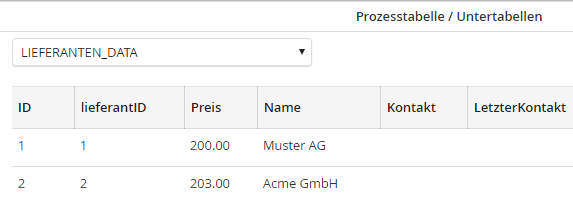
CSV System Activity: Imported data
Automatic determination of decimal separators
The system activity for CSV import automatically determines the decimal separators for decimal fields. A value without a thousand separator with exactly one comma or period is always assumed to be a decimal number.
Content of a CSV file:
ID;VENDOR;PRICE
1;Company A;1,000,000.99
2;Company B;1.000.000,99
3;Company C;1'000'000.99
4;Company D;1'000'000,99
5;Company E;1.000.000
6;Company F;1,000,000
7;Company G;1'000'000
8;Company H;1,999.1
9;Company I;1.999,1
10;Company J;1,999
11;Company K;1.999
12;Company L;1'999
13;Company M;1999
If you now assume that the CSV field PRICE, from this example, is a decimal field configured in the JobRouter, then the CSV field PRICE would be imported into the subtable as follows:
1,000,000.99 => 1000000.99
1.000.000,99 => 1000000.99
1'000'000.99 => 1000000.99
1'000'000,99 => 1000000.99
1.000.000 => 1000000
1,000,000 => 1000000
1'000'000 => 1000000
1,999.1 => (out) 1999.1
1.999,1 => (out) 1999.1
1,999 => (out) 1.999
1.999 => (out) 1.999
1'999 => (out) 1999
1999 => (out) 1999
Please note: The CSV import fails if the CSV file tries to import a non-numeric value for a configured decimal field. Empty values, on the other hand, are processed normally during import.
