Create or modify subtable fields
To get to the overview of a subtable, you must first click on the icon  in the overview. You see all the fields that have already been created in the selected subtable.
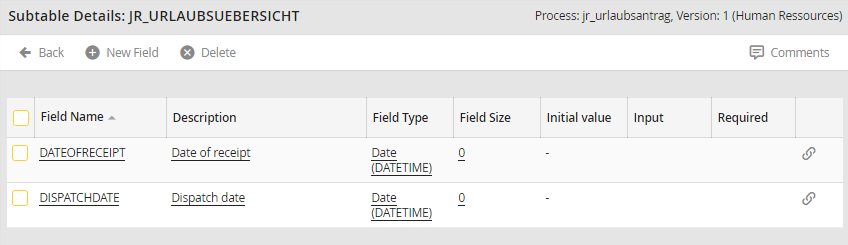
Subtable details
If you want to edit an existing field, click on the name. To create a new field, choose New rield in the action bar. In both cases, you see the editing mask for the subtable fields.
Please note: The field names and types are fixed for previously defined fields. They cannot be modified subsequently.
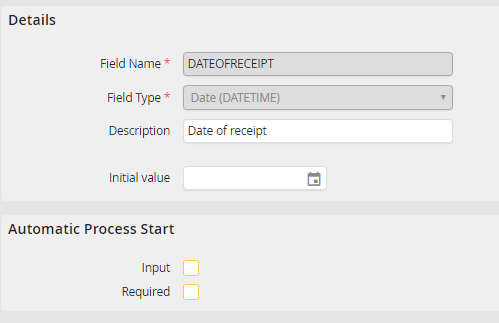
Modify a subtable field
You can assign the following properties to the field.
Field property |
Description |
|---|---|
Details |
|
Field Name |
Assign a name to the table field. The name is required and cannot be subsequently changed after being saved. |
Field Type: •Text •Attachment •Integer •Big Integer •Decimal •Long Text •Date (DATETIME) •Date (TIMESTAMP) •Encrypted Text |
Select one of these field types: •Text •Attachement •Integer •Big Integer •Decimal •Long Text •Date (DATETIME) •Date (TIMESTAMP) •Encrypted Text |
Description |
Enter a description for your table field. The description is only used for documentation. |
Field size |
Field size can be defined for text fields. |
Decimal places |
For decimal fields, you can specify the number of decimal places. |
Initial value |
You can set an initial value, which, for example, could be a specific date in the case of a date field. |
Automatic Process Start |
|
Input |
If this checkbox is enabled, you can fill the field externally when the process is started automatically. If this checkbox is disabled, the fields cannot be filled externally. |
Required |
A required field must be externally filled during automatic process start. Otherwise, the process cannot be completed. |
Deleting subtable fields
Check the box next to the field to delete, then click Delete in the action bar. The field will be deleted.
Please note: As soon as you delete a table field from a subtable, the field is deleted in all previous and current versions of the process. All process data that is already stored in the fields is irrevocably lost!
