If you have selected a subtable for use in the routing rule, you can specify how the subtable rows are to be distributed to the subsequent steps.
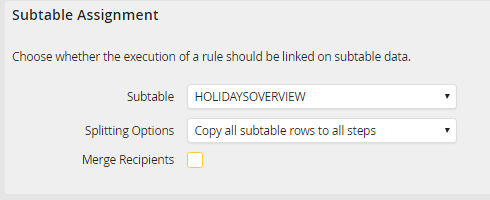
Distribution of subtable rows in routing rules.
You can choose from the following distribution methods.
Distribution method |
Description |
|---|---|
Copy all subtable rows to all steps |
•This gives all subsequent steps access to all the subtable rows. |
Distribute subtable rows to all steps |
•This divides the subtable rows among all subsequent steps. •Each subsequent step receives exactly one row of the subtable |
Do not copy subtable rows to new steps. |
•The subtable rows are not passed on to the created subsequent step. |
Merge recipients |
•If you distribute the subtable rows to all steps, you can merge multiple rows of a single recipient by activating this option. •A subsequent step is created for each recipient and the corresponding rows passed to the respective subsequent step. |
Example:
For example, you have created a subtable whose rows are invoice line items. By distributing the rows, every user receives the invoice line item they need to work on. You can create several steps, each of which contains a subtable row. If you wish to assign several subtable rows to a user, you can combine the rows, causing the user to receive all the assigned subtable rows in one step.
