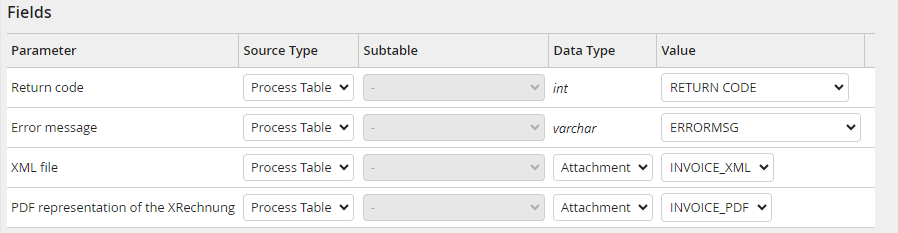
Output parameters: Fields
Return code
If this parameter is linked to a table field, non-fatal document errors (return code >=2) are interpreted as warnings. The system activity is not set on error status, which means that a process designer is able to manage the further process flow based on the return codes. Otherwise, the step is set on error status after an error, independent of its severity level.
Possible values are:
Value |
Description |
|---|---|
-1 |
Fatal error. The system activity is always set on error status. |
0 |
Successful execution |
2 |
The document version is too old for the date of issue of the document. |
3 |
Unknown document version. The complete data extraction cannot be guaranteed. |
4 |
An X-Rechnung visualization could not be created. |
5 |
An extended document version. Complete data extraction cannot be guaranteed. |
6 |
The PDF file is not PDF/A compliant. |
11 |
Validation error in the data structure or format occurred. |
100 |
Multiple error types with the code >=2 occurred. |
Error message
If the errors occurred during the processing of the action, this parameter returns the error messages, separated by semicolons. As they can be quite long, we recommend to use a sufficiently large table field (field capacity more than 1,000 characters).
XML file
Please note: You do not normally need this file for further processing of the invoice in the process. However, it can be helpful for further analysis in the event of problems.
Here you specify the column to which the extracted ZUGFeRD (xml file) is transferred.
Please note: If file path is selected as the Data Type, the XML output path parameter must be configured for the Input Parameters in the Fields section.
Please note: If attachment is selected as Data Type, xml must be allowed in the system-wide list of file extensions.
PDF representation of the XRechnung
An XRechnung is an XML file in which the invoice data is stored in a machine-readable format. For user-friendly display, e.g. in the archive or in the viewer, a human-readable PDF file can be generated for the XML and saved back into the process.
Please note: Only Attachment is supported as Data Type.
