Use the Output Parameters tab to define the values to be returned to the instance:
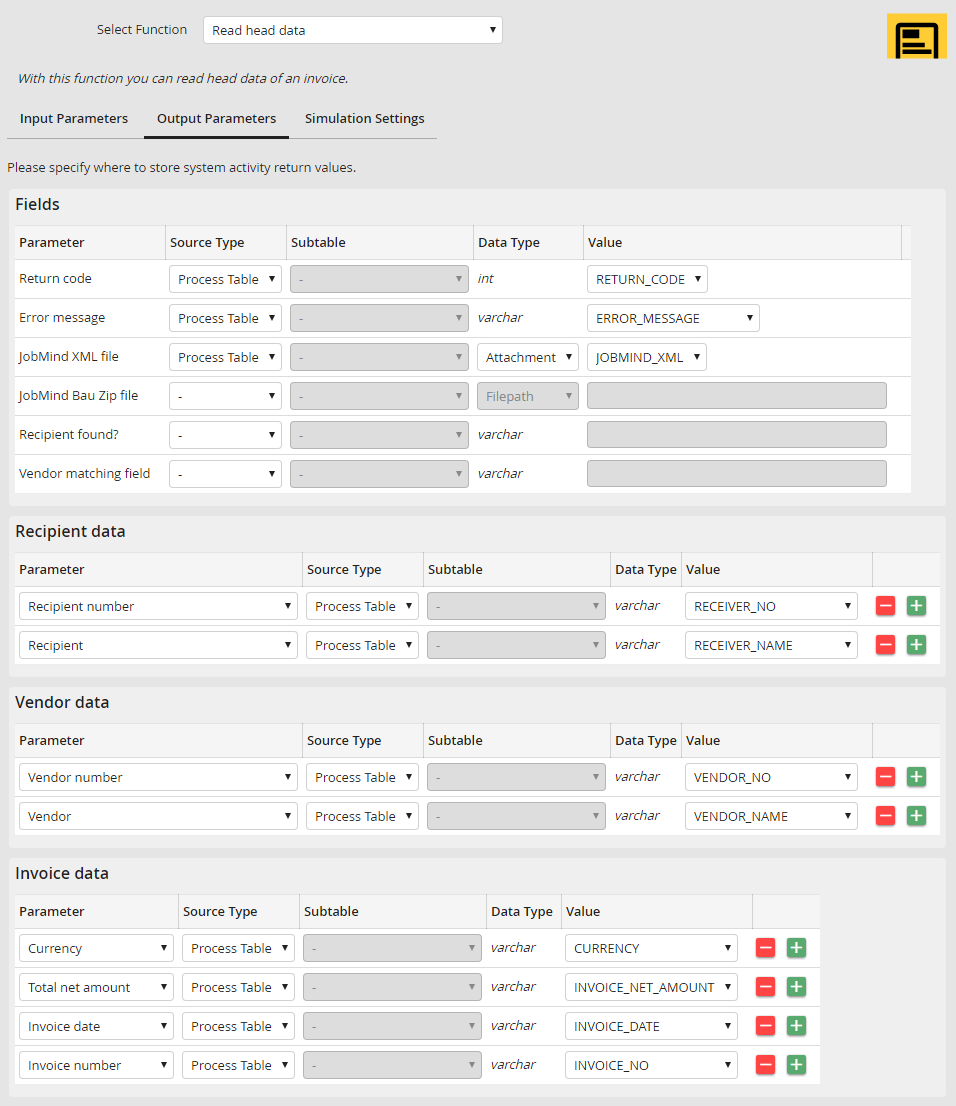
Return code
This parameter is assigned the value 1 after a successfully completed action, otherwise -1.
Error message
If an error occurred during the execution of the action, this parameter will return the respective error message.
JobMind XML file
Select the attachment column to which the result XML file of the JobMind module is passed. You usually do not need this file, but it can be helpful for the analysis in case of problems.
JobMind Bau Zip file
This field is only available with a JobMind Bau module license. Please refer to the JobMind Bau manual for further information.
Vendor found?
Use this output parameter to determine if a vendor was identified or not. If yes, the parameter returns the value 1, if not, the value 0.
Vendor matching field
For analysis purposes, you can use this field to receive information on which criteria was used to uniquely identify the vendor by JobMind Head.
Vendor data
You can write the data of the detected vendor into the process table fields here. As soon as a vendor is recognized, all further fields will be pulled from the vendor master data and added. The unique key for all vendors is the vendor number in connection with the recipient number.
Invoice data
You can write the head data of the invoice here. Next to the invoice number and invoice date, numerous sum fields are available that can be used for example to read net, pre-tax and tax amounts.
Tax data
In addition, you can write tax data in a subtable here. This can be useful if you plan to process invoices with multiple different tax rates. One row will be added to the subtable for each tax rate. You can select if you want to read the net amount, the tax amount or the tax rate.
