You can define your input parameters on this tab:
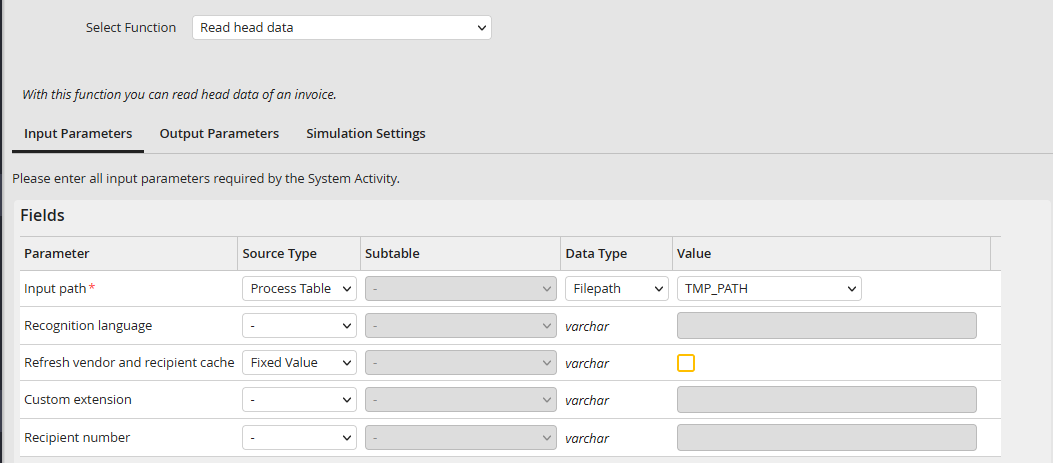
Input parameter
Input path
You can link the file you want JobMind Head to analyze here. Currently, PDF as well as TIFF files are supported.
Please Note: If you are using Path as data type and a file with special characters (Umlauts etc.), they might not be able to be processed by the file system. In this case, you can set the constant CONST_PLATFORM_CHARSET in the config.php to the respective value (e.g. windows-1252).
Recognition language
Define a language code for the recognition of the invoices. This setting helps to improve the quality of the results, as the software is especially looking for key words in the respective language and the OCR analysis can produce better results as well if it is able to use the corresponding dictionary. If no language was defined, the system will use German as default. The following table lists all supported languages with their language code:
Language |
Code |
|---|---|
German |
de-DE |
French |
fr-FR |
Polish |
pl-PL |
Refresh vendor and recipient cache
To be able to instantly use changes to the vendor and recipient cache in the analysis of the next invoice, you can use this option to enforce an instant refresh of the cache. If this option is not activated, the cache will be refreshed according to the configuration in the module settings. Vendors and recipients can only be recognized if the cache was refreshed before the execution.
Custom extension
JobMind can be expanded with project-specific extensions allowing to read data from documents that is not recognized in the default state of the module (e.g. a project number). To use such an extension, it has to be installed. Afterwards, you can list the individual extensions separated by a comma (e.g. projectnumber,costcenter).
Recipient number
Pre-defined recipient number. Using this input parameter disables the internal recipient recognition mechanism.
