In most of the cases data from Zapier are forwarded to process table fields.
If you want to save values in a subtable, the procedure is different:
Here the syntax is identical to the one in the JobRouter Rest Api.
subtables[0][name] = Subtable name
subtables[0][rows][0][fields][0][value] = Value to be transferred from Zapier
The counting of the subtable line is starting at 0. The subtable name must only to be defined once in Zap (workflow).
First, specify a subtable name as in the example above. For each additional subtable the number is increased by 1.
Please insert for each subtable column the column name and the respective value in Zapier.
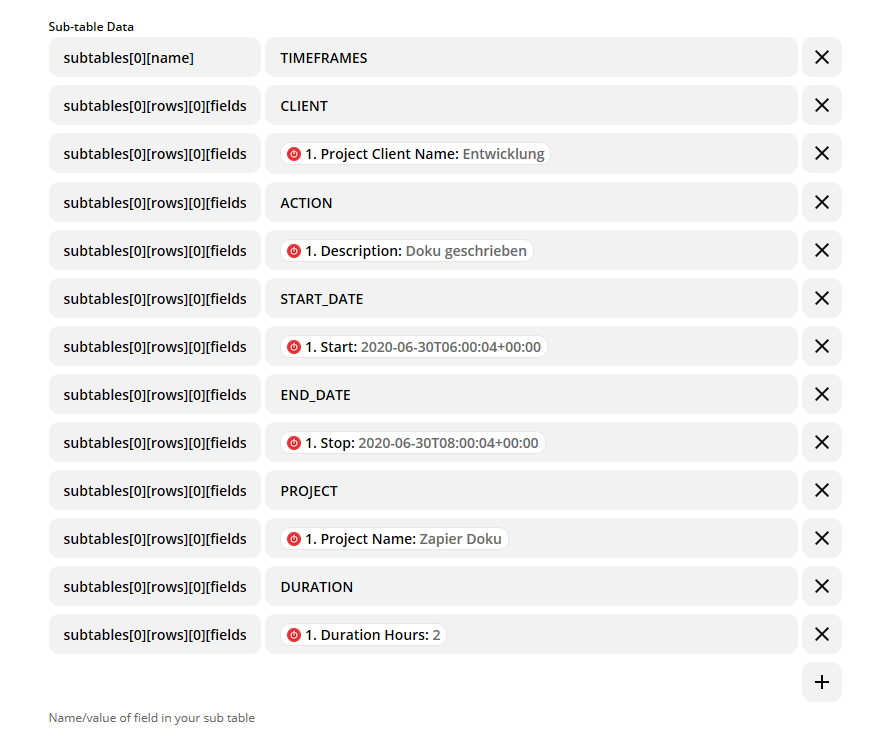
Zap with 6 columns in the subtable
View in JobRouter:
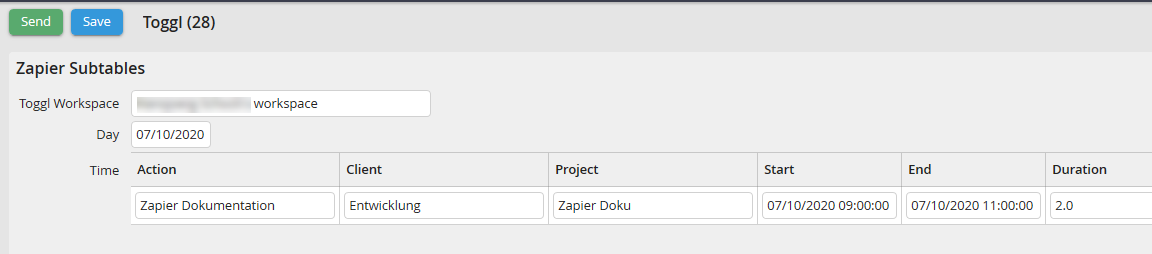
JobRouter subtable
Example: Transfer of two sub-table rows from Zapier to JobRouter
subtables[0][name] Contacts
subtables[0][rows][0][fields][0][name] Name
subtables[0][rows][0][fields][0][value] John Doe
subtables[0][rows][0][fields][1][name] email
subtables[0][rows][0][fields][1][value] john.doe@email.com
subtables[0][rows][0][fields][2][name] Phone
subtables[0][rows][0][fields][2][value] 123456789
subtables[0][rows][1][fields][0][name] Name
subtables[0][rows][1][fields][0][value] Max Mustermann
subtables[0][rows][1][fields][1][name] email
subtables[0][rows][1][fields][1][value] max.mustermann@email.com
subtables[0][rows][1][fields][2][name] Phone
subtables[0][rows][1][fields][2][value] 98765445
