You can specify SQL queries on the Database tab. These queries are passed to the JobRouter database via the selected database connection or the JobRouter database connection.
Please note: Before using SQL queries within an action rule, read the chapter Instructions for working with SQL fields in JobRouter carefully.
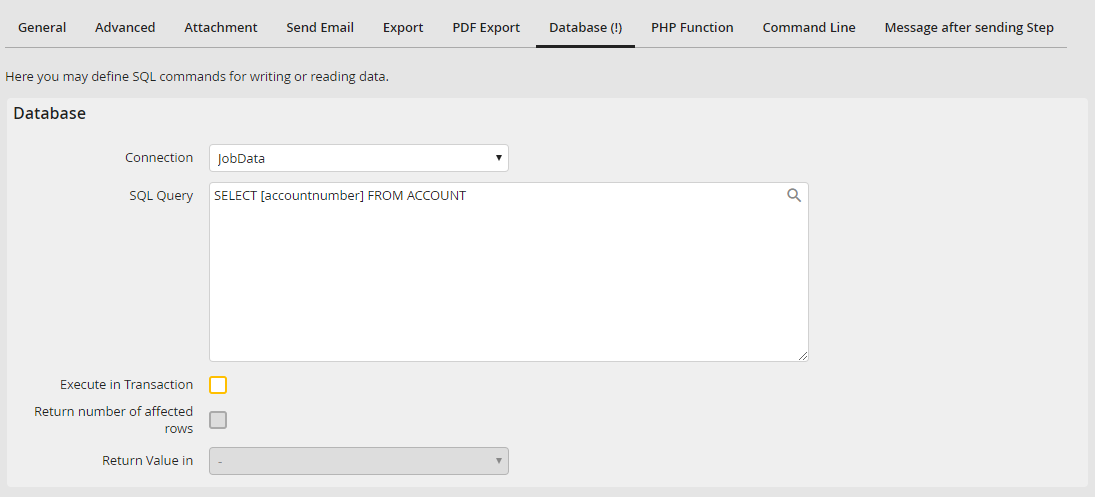
Database
Select the database connection you want to use for the SQL query in the connection list.
By ticking the checkbox Execute in Transaction, the SQL query will be performed during the rule execution within the transaction, while the step is sent. The step enters the error status if an error occurs during the SQL query execution. In case of an error during the rule execution, only the transaction is rolled back on the JobRouter db. INSERTS etc. that can be found on an external or Remote DB connection (cloud) remain. If the checkbox is not activated, the SQL query is only performed after the transaction has been finished and when the step is sent. In this case, an error during the SQL query execution does not lead to an error status of the step.
Please note: If you wish to write into JobRouter tables, you should not do this within the transaction. Otherwise your changes will be overwritten when the step data is written back during the completion of the transaction.
If the option Execute in transaction is activated, you can receive the result of the database query.
When enabling the checkbox Return number of affected rows not the result of the query itself but the number of records affected by the statement is returned when using SQL statements of the type INSERT, UPDATE or DELETE.
Please note: Do not use this option for SELECT queries. The SELECT query is still running but you do not get a return. If you want to determine the number of affected rows of a SELECT query, use the COUNT() SQL function instead.
Select a process table field from the Return value in the pick list to accept the returned query value.
