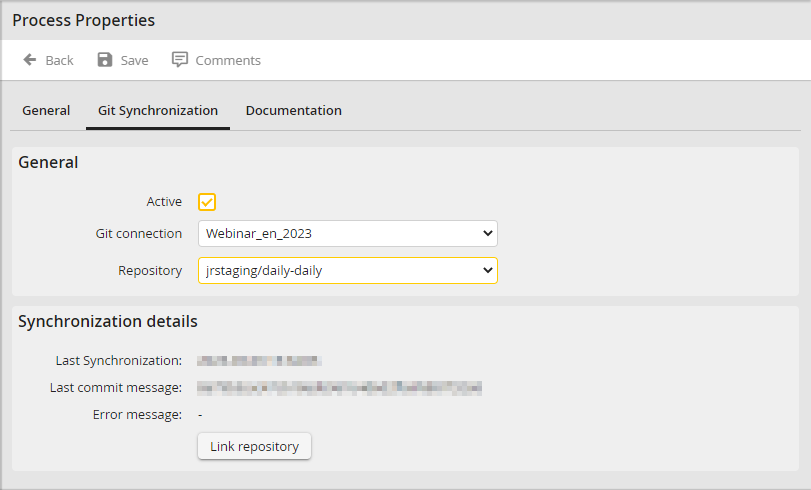
To link a repository to the process, go to Properties in the Process Designer navigation below Process Settings and then switch to the Git Integration tab.
You are in the form with the selection of the target repository and a linking action.
Link new repository
Link existing repository
First select a Git connection previously created in the module settings of JobSync. After a short loading time, the available repositories are listed in the Repository selection list.
Select the target repository that you want to link to this process version. Under the synchronization details, you can link the selected repository to this process version via Link repository.
Please note: You can only create a link if the target repository is not yet linked to another process version!
JobRouter now places all PHP scripts, JavaScript files, files of the functions and data directories of this process version in a hierarchical structure in the repository. This procedure can take up to one minute. Afterwards, the structure of the repository should look like this:
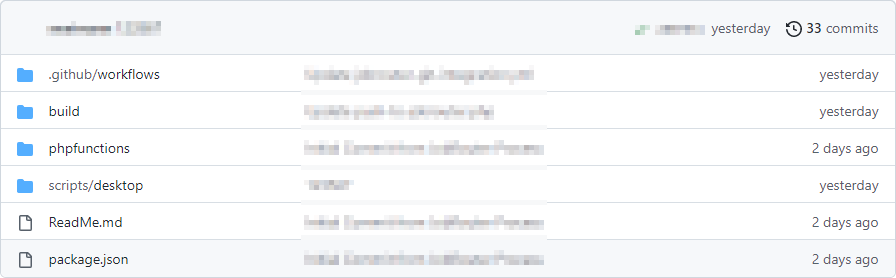
Example from Github: repository structure after linking
The directories "build", ".github/workflows" and the files "readme.md" and "package.json" are always part of the structure. The "phpfunctions" and "scripts" directories vary due to the existing components in the linked process version.
Activate the synchronization with the Active checkbox and Save your changes.
Please note: Once you enable synchronization, all code editors for scripts and PHP are disabled. Only after deactivating synchronization, the editors will be reactivated.
Settings in the repository
In order for the files you have changed and added to be synchronized in JobRouter, you still have to create Secrets in the repository. To do this, go to the corresponding configuration interface in the repository properties. For Github, you can find the appropriate documentation here: Encrypted Secrets
Secret Name |
Definition |
|---|---|
JR_URL |
JobRouter-URL e.g.: https://myjobrouter.com/jobrouter |
JR_USERNAME |
Technical user with process design rights to the respective process. |
JR_PASSWORD |
Password to the user name in JR_USERNAME |
If you now execute a commit on the repository, the workflow is started to synchronize the changes in JobRouter.
Please note: Only changes committed on the "main" branch are taken into account.
