Click on the Zapier system activity symbol in the JobRouter Process Designer and drag it into the middle.

Input parameters
In JobRouter 5.1 only the option Call Webhook URL is available in Select function.
HTTP method:
Zapier can receive POST, GET as well as PUT Request. POST Request is offered by default.
Please use the POST or PUT method, if your application contains the following:
•Sending of data (file objects cannot be send via a user-defined request)
•You do not write an unformatted JSON or XML and want the Zap to analyze the data for you.
Webhook URL:
Insert here the Webhook URL from the Zap you created as described in the example above.
Data mapping:
Here you determine, which data you want to be forwarded to Zapier. Click the Plus symbol to add a new line and insert an appropriate name in the field Parameter. This name can be found later on in the Zap and serves the transfer to external applications.
A process table field or a fix value can be used as resource.
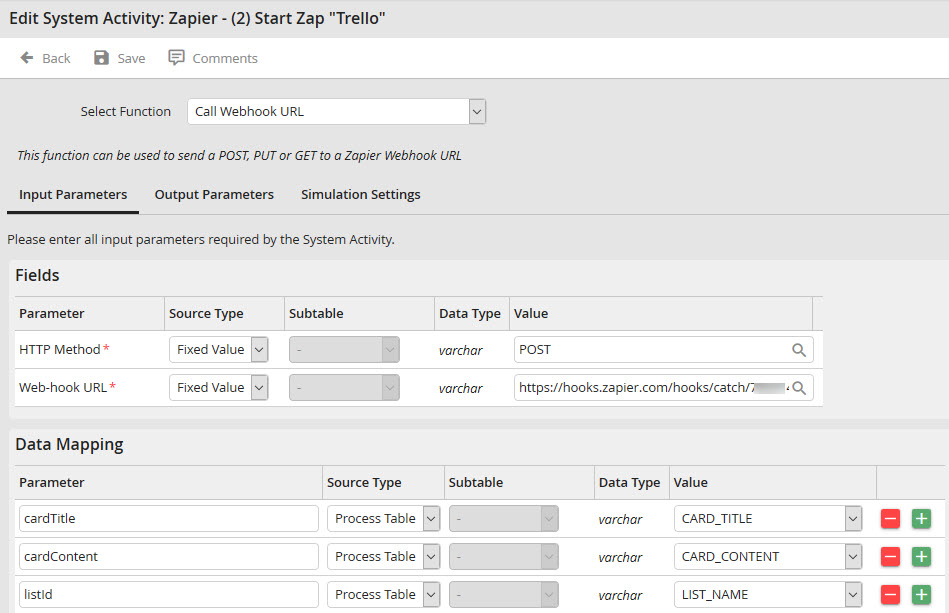
Zapier system activity
Output parameters
The Zapier Webhook URL returns 4 parameters as response.
These are Status, Attempt, ID and Request ID.
You can save these response data in process table fields and use them in the workflow later on.
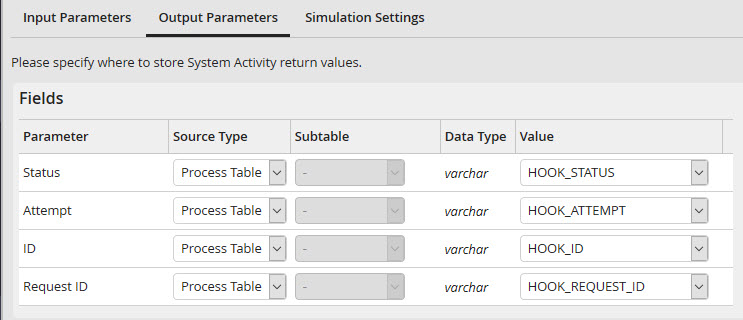
Output parameters
A response can look as follows:

