How you assign permissions for the web service depends on how the rights assignment is set in the security settings, either on a user level or on profile level.
Assign permissions on user level
1.Distribute the relevant rights to all users who are permitted to use the JobRouter web service. This can be done in the user management of JobRouter: Admin Tools > Manage users.
2.Choose the user that should receive access to the JobRouter web service and swap to the tab Security:
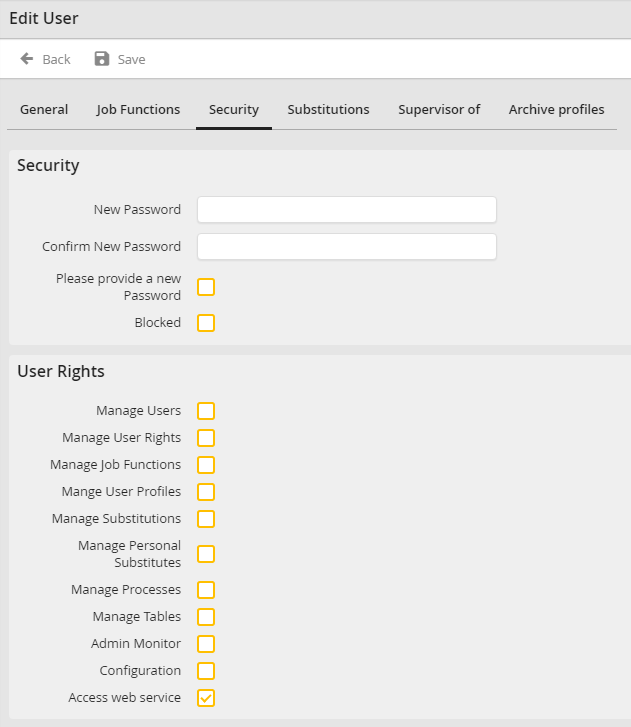
3.Tick the box Access web service. To apply the rights settings click Save.
To provide more users with the right to access the web service, repeat the above steps.
Assigning permissions on profile level
Distribute the relevant rights to all user profiles who are permitted to use the JobRouter web service. For this, go to the Manage User Profiles under Admin Tools to view all available profiles. Select the profile you want to edit.
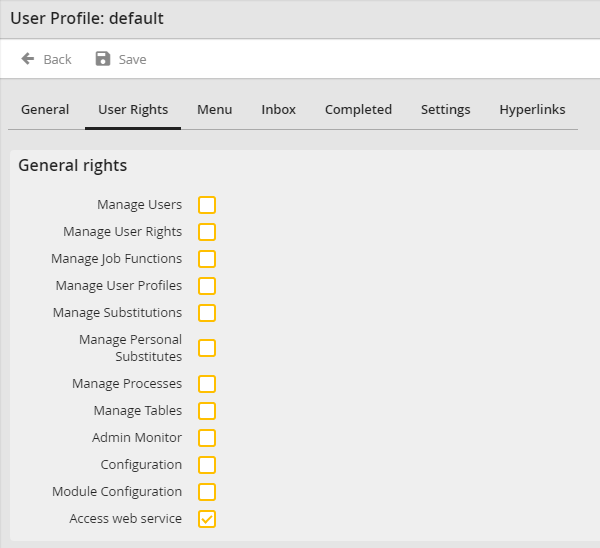
In the User Rights tab, you can assign rights the same way as in the user configuration. Tick the box Access web service, then press Save.
