You can create up to five actions in every inbox. The inbox users can execute these actions in one or several entries. The user marks the instance steps in the appropriate checkbox. and selects the desired action from the list displayed below the table.
To define the individual actions, click Action in the Edit Process Inbox form window. The following input mask appears.
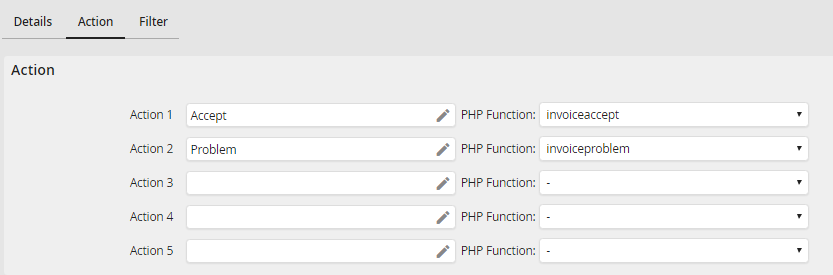
Modifying a Process Inbox - Action
Enter the label of the desired actions into the fields (for example, Approval, Refusal). If your process is multilingual, you can provide labels in multiple languages.
If you created PHP functions of the type Box action function, they can be linked with the individual actions. For this, select the corresponding entry in the pick-list PHP function of the respective action. The selected box action function will be executed immediately when the user selects the action in the inbox, before the selected steps are send. Inside the box action function you can exclude steps selected by the user from the group of steps that are to be processed. The execution of the box action itself can also be prevented and messages displayed in the inbox of the user.
If you select True in the box action function, the marked steps will be send automatically, as if the user had opened them and pressed the Send button. Please bear in mind that the form scripts, such as the review of required fields or own functions, will not be performed. But usually the different actions can be queried from the inbox by using the JobRouter system variable [jr_boxaction]. This variable contains the number of the action performed.
