Export the data from the current workflow step into a file using one of the functions Export to XML, Export to TXT, or Export to CSV. The file will be written to the output directory.
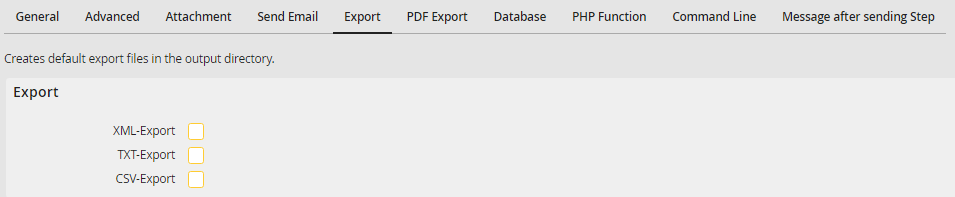
Exporting data
XML export
The filename consists of the process name, the process ID, the instance number, the step number and the file type .xml.
Example: Incominginvoices_52090398b63fd6f93060a4e4d20b76590000000008_65354_1.xml
The file contains all data for the current workflow step. Every process step will be enclosed in the tags <PROCESS> and </PROCESS>. Within these tags, three sections are created, each enclosed within other tags shown below.
•Processdetails (<PROCESSDETAILS> … </PROCESSDETAILS>)
General data from the process steps, for example, process name and process ID are written in this section.
<processname>Invoicereceipt</processname>
<version>1</version>
<processid>52090398b63fd6f93060a4e4d20b76590000000008</processid>
<description>Validation of incoming invoices</description>
<initiator>jsmith</initiator>
<startdate>25.06.2015</startdate>
<indate>25.06.2015</indate>
<step>1</step>
<workflowid>52090398b63fd6f93060a4e4d20b76590000000030</workflowid>
<jobfunction>invoices</jobfunction>
<incident>65354</incident>
<summary>JobRouter AG, 53683493</summary>
•Processdata (<PROCESSDATA> … </PROCESSDATA>)
All process table fields and their values are listed within this area.
<field name=“creditor“ value=“JobRouter AG“/>
<field name=" invoicenumber" value="8304834737"/>
<field name="invoicedate" value="18.06.2015"/>
…
•Subdata (<SUBDATA> … </SUBDATA>)
All subtable data is listed within this area for each subtable.
<subtable name="ITEMS">
<item>
<subfield name="itemnr" value="1"/>
<subfield name="article" value="Notebook 15 inch"/>
…
</item>
<item>
<subfield name="posnr" value="2"/>
<subfield name="article" value="Screen 27 inch"/>
…
</item>
…
</subtable>
…
TXT export
The filename consists of the process name, the process ID, the instance number, the step number and the file type .txt.
Example: Incominginvoices_52090398b63fd6f93060a4e4d20b76590000000008_65354_1.txt
The file contains all data for the current workflow step. The file begins with the word [PROCESS]. The following three sections follow:
•Processdetails ([PROCESSDETAILS])
General data from the process steps, for example, process name and process ID are written in this section.
Example:
processname=Invoicereceipt
version=1
processid=52090398b63fd6f93060a4e4d20b76590000000008
description=Validation of incoming invoices
initiator=jsmith
startdate=25.06.2015
indate=25.06.2015
step=1
workflowid=52090398b63fd6f93060a4e4d20b76590000000030
jobfunction=invoices
incident=65354
summary=JobRouter AG, 53683493
•Processdata ([PROCESSDATA])
All process table fields are listed within this area.
Example:
creditor=JobRouter AG
invoicenumber=8304834737
invoicedate=18.06.2015
…
•Subdata ([SUBDATA])
All subtable data is listed within this area
Example:
[ITEM]
[item]
itemnr=1
article=Notebook 15 inch
…
[item]
itemnr=2
article=screen 27 inch
…
CSV export
The filename consists of the process name and the process ID, and the file type is .csv.
Example: Incominginvoices_52090398b63fd6f93060a4e4d20b76590000000008.csv
The file contains all data for the current workflow step, with fields separated by semicolons.
•The first line contains global data for the step (process name, version, step, workflow ID, step ID) followed be the values of the columns of the process table.
Example:
Incominginvoice;1;1;52090398b63fd6f93060a4e4d20b76590000000030;52090398b63fd6f93060a4e4d20b76590000000023;JobRouter AG;8304834737;18.06.2015;…
•In the following lines, all data of the subtables is listed. They begin with a row of empty fields. Afterwards, the values of the columns of the respective subtable are listed.
Example:
;;;;;;1;Notebook 15 inch;…
;;;;;;2;Screen 27 inch;…
…
